Crew planning for an ultramarathon is one of the most underestimated sources of race-day stress. You spend months training, then hand your crew a handwritten note with rough guesses about when you might arrive somewhere. They drive to the wrong trailhead. They miss you by twenty minutes. You reach an aid station without the thing you needed most.
For Kettle Moraine 100K this past weekend, I used the Iron Miles Race Planner. This is what that looked like.
out-and-back
planned and timed
stops
at every stop
How the Timing Model Works
The planner starts with a 90-day Garmin export: VO2 max, heart rate zone distribution, average elevation gain per run, and training load. It derives your base easy pace, a climb penalty in minutes per 1,000 feet, and a pace decay rate that accelerates after mile 25. For runners with significant Zone 3 training, the decay is steeper. Zone 3 training does not build the aerobic base that holds pace late in a race.
For Kettle Moraine, it set a base pace of 10:00 per mile from a VO2 max of 51 and flagged elevated decay from Zone 3 training. That warning was accurate. The back half was harder than I planned for, and the model had already said it would be.
To set up the course, you upload a GPX file from the race website or type your aid stations in by hand. Kettle Moraine posts a course GPX on its site. I uploaded it and the planner pulled in station names, mile markers, and elevation gain automatically. Then I added cutoff times and flagged which stops have crew access. Enter your start time and hit Calculate. It produces predicted arrivals, elapsed splits, cutoff buffers, and confidence bands across all 18 stations. Crew-accessible stops get a "Crew Arrive By" time built 30 minutes before the predicted runner arrival.
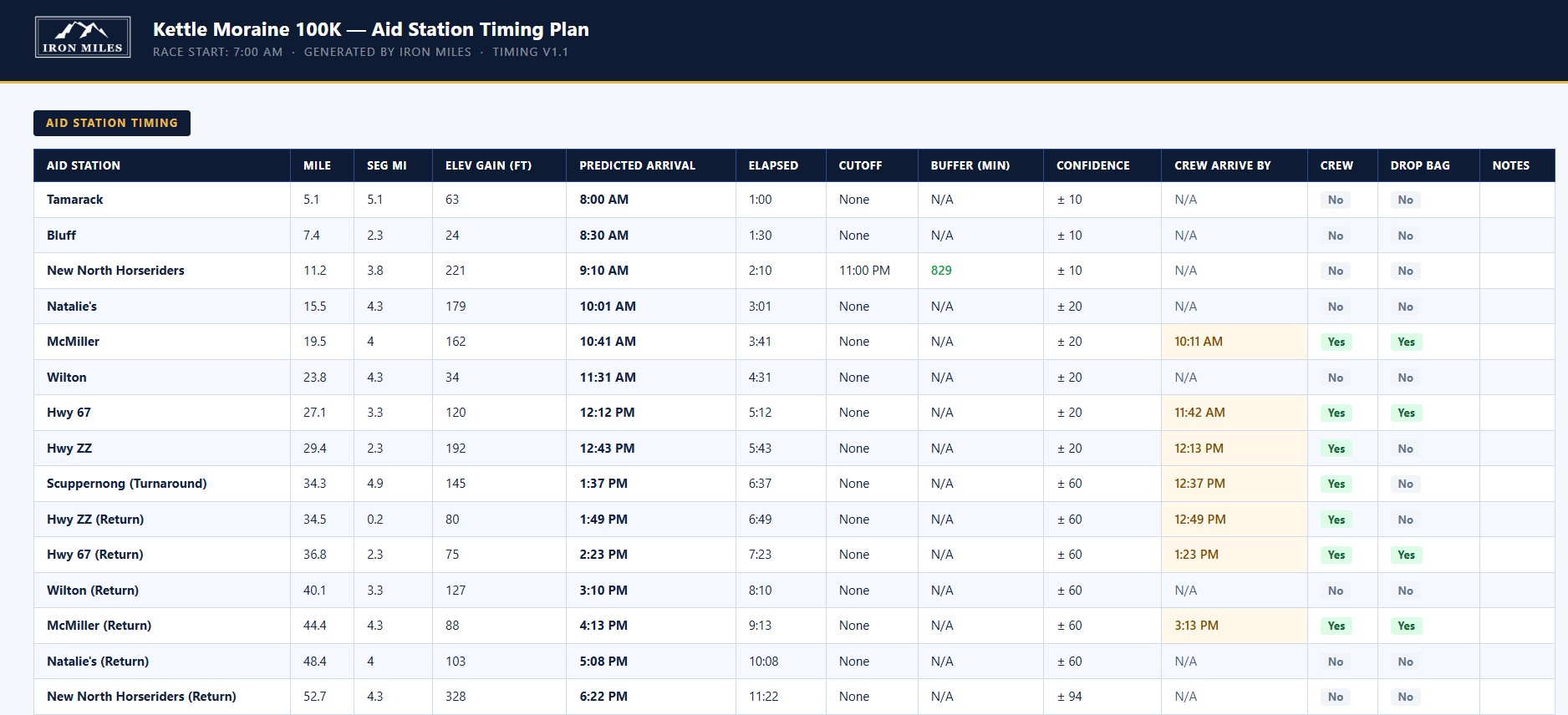
"At mile 52, the confidence band is plus or minus 94 minutes. That is not a flaw. That is the race telling you the back half is unpredictable, and your crew should plan for a wide window."
What Your Crew Sees
For each crew-accessible stop, you add a parking location, a task list, and any notes. No generic suggestions. Your specific instructions for what you need at that exact mile. At McMiller (mile 19.5), my list included: refill water bladder and large flask, replenish gels, refill electrolyte mix, offer sunscreen, ice bandana, check feet, ibuprofen and voltaren. I added a note: "check how I am doing."
From the Crew Logistics tab, you copy a link and send it to your crew. No account needed on their end. This is what they see on their phone:
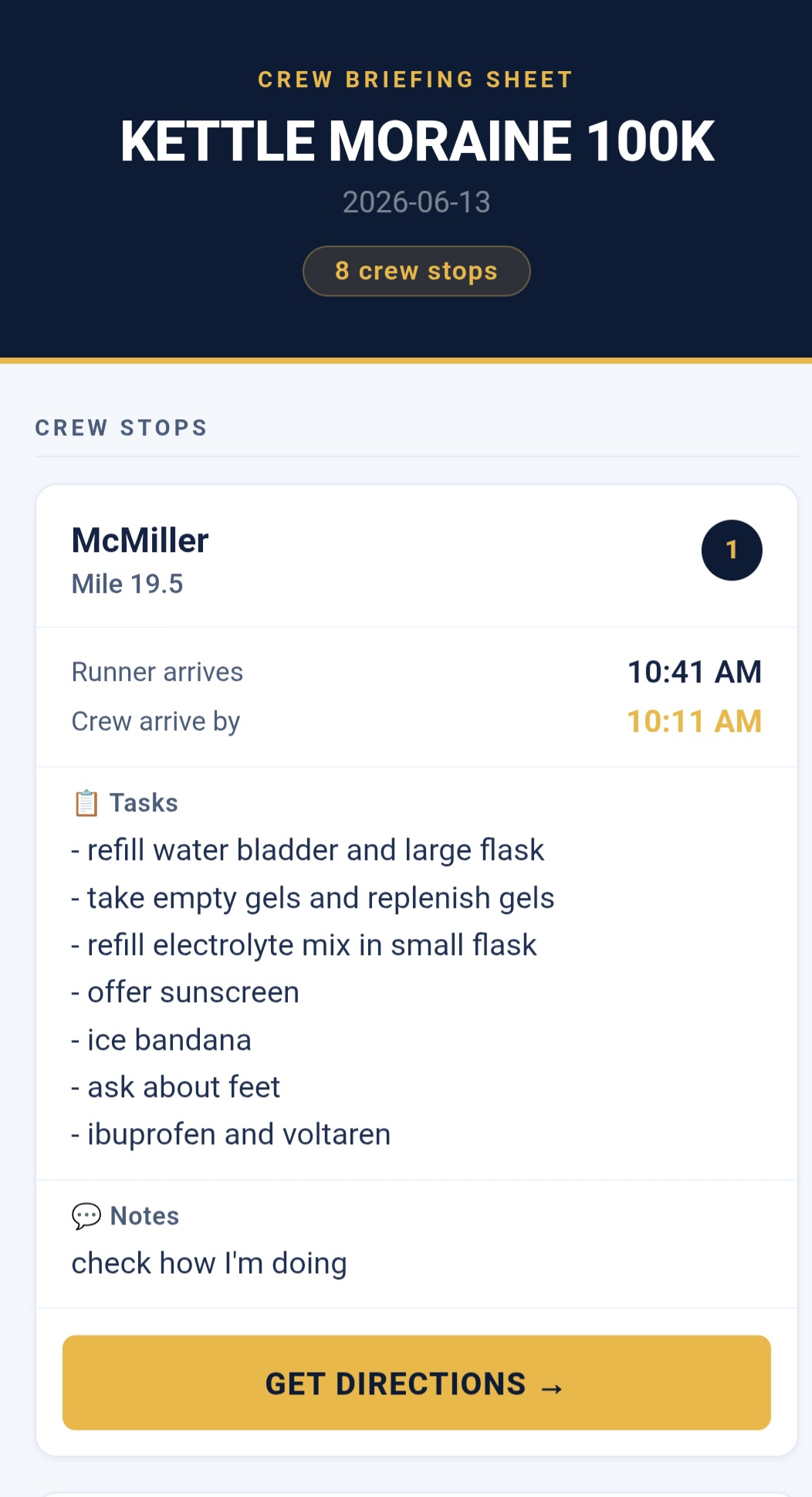
The crew briefing sheet as it appears on a phone. Each stop shows predicted arrival, crew arrive-by time, task list, notes, and a Get Directions button for turn-by-turn navigation.
Each stop shows the runner's predicted arrival, when crew needs to be there, the task list, notes, and a Get Directions button that opens turn-by-turn navigation to that exact location. No screenshots in a group chat. One link, everything on their phone. Print it if your crew prefers paper.
The Race Planner is free across all four tabs: Aid Station Timing, Drop Bags, Crew Logistics, and Pacers. Garmin integration is a paid upgrade that more accurately estimates your pace based on your actual VO2 max, training load, elevation history, and more. Open the Race Planner.
What It Changed
The problem with traditional crew planning is not that runners are disorganized. It is that the information lives in five different places and never gets assembled into a usable plan until the night before, when everyone is tired. With the Race Planner, the plan is built during training and shared before anyone packs a car. My crew arrived at every stop ahead of schedule with the right supplies ready. Racing is hard enough. The logistics do not have to be.
Keep Reading
Ready to build your training plan?
Answer a few questions about your fitness and goal race. Get a week-by-week plan in minutes.
Build My Plan